MyTSA
- 3.9
- Rating
- 1.00M
- Installs
- Free
- Price
 Analysis by App-foxy
When I am preparing for a flight, I do not want to dig through several government pages just to answer a simple question about security screening. That is where MyTSA makes sense. It is a free Travel & Local app from TSA Mobile Team that puts commonly requested passenger information in one place, and I find its value strongest before leaving home rather than while rushing through an airport.
The app is aimed at ordinary travelers, not aviation enthusiasts. Its Everyone content rating makes it suitable for families, occasional flyers, and people who simply want a clearer idea of what to expect at a checkpoint. It has been available since November 1, 2012, and its continued presence, along with more than a million installs, suggests that it has become a familiar reference tool for many passengers.
How MyTSA fits into a real travel day
My first use would be the evening before a trip. I would open the app to refresh my memory about screening rules, check the information relevant to my airport, and then make a packing decision before the suitcase is closed. That timing matters. A security-information app is most useful when it prevents a problem, not when I am already standing in line with a questionable item in my bag.
You May Also Like

 Blood Strike: 2.5 Anniversary
Blood Strike’s Loadouts Turn Every Drop Into a Tactical Gamble
A close look at Blood Strike’s custom loadouts: how fast access to signature weapons reshapes its battle royale rhythm, rewards preparation, and narrows the gap between fights.

 Pandora - Music & Podcasts
Pandora’s Music Is Easy to Start, but Harder to Recover
Pandora’s strength is its low-effort path from a seed to a station. Its weak spot is how much confidence it asks you to place in connection, setup, and quiet recovery.

 8 Ball Pool
 Is Built on Rivalries, Rematches, and Routine
A close look at the rivalries, rematches, shared routines, and unanswered safety questions that turn a quick pool match into a persistent mobile community.

 Samsung Music
’s Quiet Strength Is Playing What You Already Own
Its reach comes less from spectacle than from dependable access to a personal library. That simplicity is both the app’s strongest retention engine and its ceiling.

 AccuWeather: Weather Radar
AccuWeather Review: A Quick, Clear Forecast for Everyday Decisions
For everyday plans, the best forecast is the one you can understand quickly. AccuWeather makes rain timing, radar, and local conditions easy to act on, with a few trade-offs.

 Hill Climb Racing
Why Hill Climb Racing Still Turns Crashes Into One More Run
A tiny car, a bumpy hill and one more upgrade: Hill Climb Racing keeps resurfacing because its simple chaos makes every near-miss feel personal.
More From Our News Desk



A realistic example is a short domestic trip with a carry-on and a small toiletry bag. Instead of relying on an old social-media post or a friend’s memory, I can use MyTSA as a focused starting point for checking passenger guidance. If I am traveling with a child, carrying medication, or bringing an item I rarely pack, that extra check can reduce uncertainty. I still use common sense and follow instructions from airport staff, but having an official reference nearby is reassuring.
The app’s store summary describes round-the-clock access to information passengers frequently request from TSA. In practice, I see its role as a compact reference desk rather than a complete travel planner. It is not trying to replace an airline app, a boarding pass, a hotel booking tool, or a map. That narrow purpose is a strength because the screen is devoted to security-related questions instead of burying them among reservations and loyalty features.
I also appreciate that the app is free. There is no purchase decision to make before testing it, which lowers the barrier for an occasional traveler who may only open it a few times each year. For frequent flyers, the benefit is less about daily use and more about having a specialized source available when a particular trip includes an unusual item or a traveler with special circumstances.
The current experience is practical, but not luxurious
MyTSA feels like a utility. I would not install it for visual polish or entertainment, and I would not expect the same fluid, highly personalized experience offered by major airline applications. Its job is to help me find relevant passenger information quickly. That makes directness more important than decoration.
The current version is 4.5.0, which gives existing users a useful point of reference when checking whether their installation is up to date. I treat that version detail as evidence of an actively maintained product line, but not as proof that every part of the experience has been redesigned recently. A version number alone cannot tell me how much has changed under the surface, so I judge the app primarily by whether it answers my question without unnecessary searching.
One practical habit improves the experience: I decide what I need to know before opening the app. “Can I bring this?” is a better starting question than browsing aimlessly through every section. I also check information again close to departure when the trip involves something unusual. That workflow is more reliable than saving a screenshot from months earlier, because travel guidance can change and a static image quickly becomes questionable.
What the long product history tells me
MyTSA was released in 2012, so it is not a new experiment built around the latest travel-app trends. That history is relevant. A long-running public-information tool has had time to become recognizable, but it may also carry design decisions from an earlier generation of mobile software. I notice that trade-off whenever I compare a focused government utility with a modern commercial travel dashboard.
The developer is listed as TSA Mobile Team, which makes the app’s identity clear: this is a TSA-focused product, not an independent packing guide that happens to discuss screening. That distinction affects how I use it. I look to it for agency-related passenger information, while I use an airline’s own application for flight changes and the airport’s channels for terminal-specific details.
The average rating is 3.9 from around four and a half thousand ratings, with roughly one and a half thousand written reviews. I read that as a mixed but respectable signal. It suggests that many travelers find the app useful, while some users likely encounter friction with navigation, freshness, or expectations about what the tool should do. I would not install it expecting perfection, but the rating is strong enough for me to consider it a worthwhile companion for the right kind of trip.
There is an important distinction between the app’s age and its usefulness today. Older software is not automatically obsolete, especially when its purpose is reference information rather than social interaction. At the same time, a mature product can feel less intuitive than newer apps. My advice is to test it before travel, not during a stressful airport moment. If the layout makes sense to me at home, I know whether it deserves a place in my travel routine.
How updates affect people who already use it
For an existing user, moving to version 4.5.0 should be viewed as a maintenance checkpoint rather than a promise of a dramatic new experience. I would update before a trip, open the app once, and confirm that the sections I depend on are easy to reach. That small test is especially useful if I have not used it since a previous vacation.
Updating ahead of time also avoids a common mistake: waiting until airport Wi-Fi is slow or unreliable. I prefer to review the app while I have a stable connection and enough time to think. If I need to verify a rule, I can do so calmly, and if the app behaves differently after an update, I discover that before the travel day.
Existing users should also keep their expectations realistic. A security reference can help with preparation, but it cannot make a final decision at the checkpoint. Screening staff may need to inspect an item, ask questions, or apply current procedures in the airport. I use the app to reduce avoidable surprises, not to argue with an officer when circumstances require a different judgment.
Another useful workflow is to separate general guidance from trip-specific logistics. I might consult MyTSA for screening preparation, then open my airline app to confirm the flight, use an airport map for the terminal, and keep my identification and boarding documents ready separately. This division of labor is more dependable than expecting one application to manage every part of the journey.
Where it is stronger than usual alternatives
Compared with a general web search, MyTSA gives me a more focused starting point. Search results can mix official pages with travel blogs, old forum answers, and advice written for a different country. When I am dealing with a TSA-related question, a dedicated app reduces that noise. I still read carefully, but I spend less time deciding which result deserves trust.
Compared with an airline app, MyTSA is better suited to questions that are not tied to one carrier. Airline applications are excellent for reservations, boarding passes, alerts, and loyalty accounts, but they are not usually the first place I look for broad screening guidance. MyTSA fills that gap without asking me to navigate through a booking interface.
Compared with a generic packing app, its advantage is authority and focus. Packing checklists can remind me about socks, chargers, or documents, but they may not answer a specific security question. MyTSA is more useful when the issue is whether an item or situation needs closer attention at screening. The trade-off is that it is not a full packing organizer, so I would not use it to build an entire holiday checklist.
Compared with asking friends, the app is less personal but more repeatable. A friend may remember what happened on one trip, while I need information that applies to my own circumstances. I particularly prefer the app when traveling with someone whose needs make casual advice unreliable. It gives me a place to begin research without treating anecdotal experience as a rule.
Three habits that make the app more useful
First, I use it during packing rather than at the airport. This is the most valuable change in workflow because it turns the app from an emergency lookup tool into a prevention tool. If an item raises doubt, I resolve that doubt before leaving home, when repacking is easy and I have time to choose an alternative.
Second, I treat unusual trips as a reason to check more carefully. A routine weekend with familiar luggage may not require much preparation. A trip involving children, medical supplies, unusual equipment, gifts, or a first-time flyer deserves a deliberate review. The app is most valuable when my personal situation falls outside my normal travel pattern.
Third, I use it alongside—not instead of—airport and airline information. If my question concerns a flight delay, terminal change, baggage allowance, or gate, I go to the relevant airline or airport source. If it concerns security preparation, MyTSA is the more natural first stop. This simple division prevents the frustration of blaming the app for information it was never meant to provide.
A fourth habit is to read the surrounding guidance instead of searching only for a single yes-or-no answer. Travel rules often depend on context, and a quick glance can leave out an important condition. I would rather spend another minute understanding the instruction than rely on a clipped sentence copied into a message or screenshot.
Who should use it, and who should skip it
I recommend MyTSA to occasional flyers who want a straightforward way to prepare for screening, families who need to think through a trip in advance, and travelers carrying items that are not part of their everyday routine. It is also useful for people who dislike searching across multiple pages and want a dedicated reference on their phone.
I am less likely to recommend it as a primary travel app to someone who flies constantly and already has a reliable preparation system. A frequent traveler may find that the airline app, airport app, browser bookmarks, and personal checklist cover most needs. MyTSA can still be a useful backup, but it may not add enough value to justify changing an established routine.
It is also not the right choice for someone expecting live flight management, detailed airport navigation, or a complete itinerary. Those users should pair it with the appropriate airline and airport tools. Installing MyTSA will not replace those services, and expecting it to do so is the quickest way to come away disappointed.
Because the app is rated for Everyone, I would feel comfortable introducing it to a family member who is not especially confident with travel technology. Even so, ease of use is personal. I would show a first-time user where to begin and encourage them to explore it before the departure day, rather than handing over the phone in a crowded terminal.
Remaining gaps and points of friction
The biggest limitation is scope. A focused security app cannot answer every question that appears during a journey. I may still need other sources for airline-specific baggage rules, airport construction, accessibility arrangements, transportation, and last-minute operational changes. MyTSA helps with one important layer of travel, but it is not a universal travel assistant.
The second limitation is that official information can still require interpretation. A page or app can provide guidance, but my item may have unusual characteristics, my destination may impose separate requirements, or the final screening context may differ. I do not use a general answer as permission to ignore instructions at the checkpoint.
The third is the possibility of a dated-feeling interface. Since the product began in 2012, I would not be surprised if some parts feel less polished than newer commercial apps. That does not automatically reduce the value of the information, but it can make discovery slower. The best response is to learn the route to the sections I use most before travel.
The rating of 3.9 also tells me not to present the experience as flawless. Some users will want faster navigation, clearer presentation, or a broader range of travel tools. Those are fair expectations when comparing it with large private-sector apps. My own view is that the app earns its place through focus, but it should be judged as a reference utility rather than a premium travel platform.
What I would watch in future use
When I return to the app, I pay attention to three things: how quickly I can reach the answer I need, whether the guidance is presented clearly enough for a rushed reader, and whether the app continues to feel useful beside airline and airport tools. Those are more meaningful measures for me than a new version number by itself.
I would also watch how well the product serves travelers with less routine needs. The strongest future direction would be clearer handling of situations that cause anxiety before a trip, such as traveling with children, medical items, or unfamiliar equipment. I cannot assume which improvements will arrive, but those are the areas where better organization would have the greatest practical effect.
For current users, the sensible approach is simple: keep the app updated, review it before packing, and confirm important details through the relevant official travel channel when the situation is specific or unusual. That gives MyTSA a defined role without asking it to carry the entire trip.
My final take after using it
MyTSA is not an app I would open for fun, and it does not need to be. Its value comes from answering a narrow set of travel-preparation questions in a place designed for passengers. The free price, Everyone rating, and focused purpose make it easy to recommend as a backup or preparation tool, especially for occasional travelers.
I would describe it to a friend this way: install it before a flight if you want a TSA-centered reference, but keep your airline and airport apps as well. Use it while packing, not only when you are already in line. That approach plays to its strengths and avoids expecting it to handle reservations, live operations, or every possible travel problem.
After considering its mature history, current version 4.5.0, and mixed-but-positive user response, my opinion is balanced. Its best feature is not breadth; it is having a dedicated place to prepare for screening. If that is the question you need answered, MyTSA is a sensible free addition to your phone. If you want one app to organize an entire journey, I would choose a broader travel solution and use this one only as a supporting reference.
FAQs for MyTSA
01What features does the MyTSA app offer?
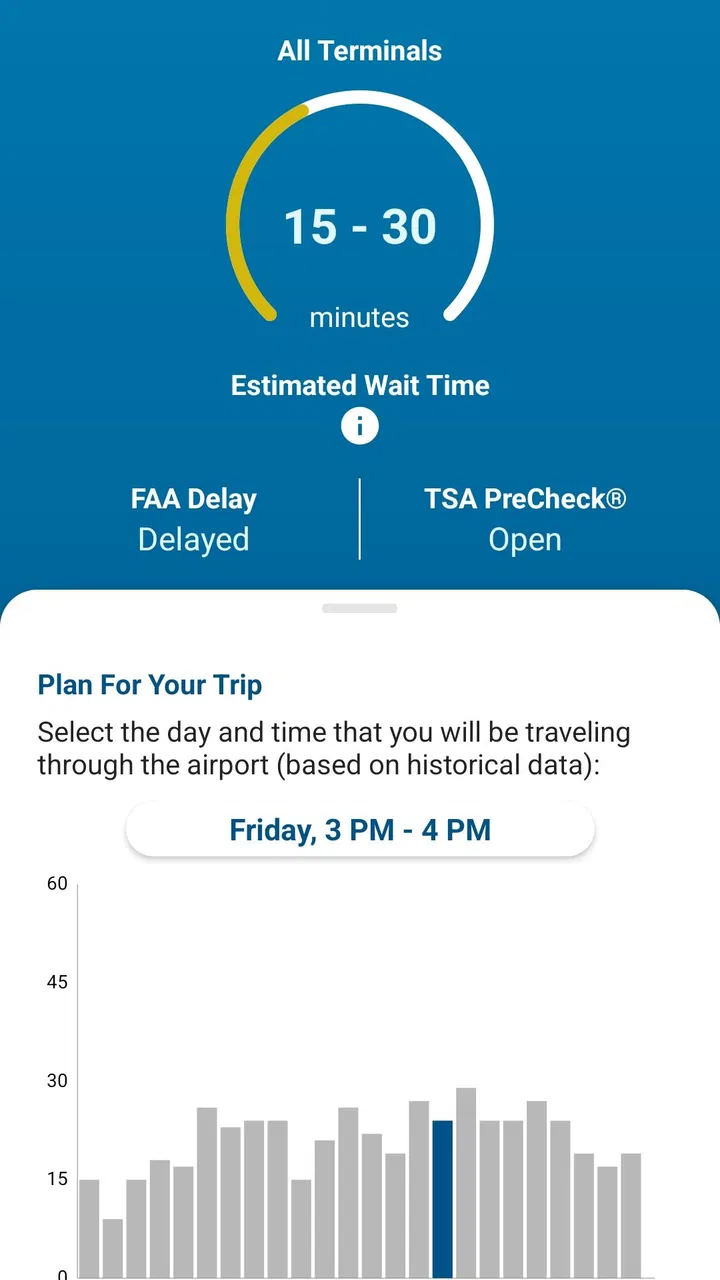
The MyTSA app provides real-time updates on airport security wait times, flight delays, and travel advisories. Users can also access TSA PreCheck information, airport-specific guides, and tips for packing and traveling. The app is designed to make your airport experience smoother by providing up-to-date and essential travel information.
02How accurate are the security wait times in the MyTSA app?
The wait times in the MyTSA app are crowdsourced and updated by users, which means accuracy can vary. However, TSA also provides data to improve reliability. It's a good idea to check the app frequently and combine it with other resources to ensure you have the most accurate information possible.
03Is the MyTSA app free to download and use?
Yes, the MyTSA app is completely free to download and use. It is available on both Android and iOS platforms. There are no in-app purchases or subscription fees, making it an accessible tool for travelers looking to streamline their airport experience.
04Can I use the MyTSA app for international travel?
While the MyTSA app is primarily focused on U.S. airports and TSA procedures, it can still be useful for international travelers departing from or arriving in the United States. However, for specific international airport information, additional apps or resources may be needed.
05How does MyTSA help with TSA PreCheck?
The MyTSA app provides information on TSA PreCheck locations and eligibility requirements. It helps travelers understand how to apply for TSA PreCheck and highlights the benefits it offers, such as expedited security screening. This feature is especially useful for frequent flyers looking to save time at the airport.
Pros
- Provides real-time airport status updates.
- Includes TSA security checkpoint wait times.
- Offers airport-specific travel tips.
- Features a user-friendly interface.
- Access to historical security wait data.
Cons
- Limited to U.S. airports only.
- Occasional delays in real-time updates.
- No offline functionality available.
- Requires location permissions.
- Not all airports provide detailed data.

MyTSA
Gallery